

C_THR81_2405 Dumps are Available for Instant Access [2025]
Practice with these C_THR81_2405 dumps Certification Sample Questions
NEW QUESTION # 31
A customer has scheduled an HRIS sync job, which includes mapping of job titles, to run every Friday. On Tuesday, an employee's job title is changed via Manager Self-Service (MSS) to become effective on Thursday.
When will the synchronization happen?
- A. Thursday, when the change becomes effective
- B. Saturday, the day after the sync job completes
- C. Tuesday, the day the transaction is entered
- D. Friday, when the sync job completes
Answer: D
NEW QUESTION # 32
This is a global customer and HR admins will be assigned based on legal entity. The HR admins should be getting approval workflows from their target population. How can you define this in one workflow?
- A. Create dynamic groups per each legal entity and add the necessary approver steps.
- B. Create a dynamic role for each legal entity and assign the Resolver as the head of the legal entity.
- C. Create a dynamic role using the Legal Entity filter and assign the Resolver type as dynamic group.
- D. Create permission groups for each legal entity and assign them to the HR admin role.
Answer: C
NEW QUESTION # 33
What properties are available when using model base objects in business rules? Note: There are 3 correct answers to this question.
- A. Max-length
- B. Visibility
- C. Required
- D. PII
- E. Previous Value
Answer: B,C,E
NEW QUESTION # 34
Your customer would like to automate its company's HR transactions. This includes auto-populating fields to reduce data entry errors and automating approvals during self-service transactions.
You are asked to create the following rules based on your customer's requirements:
* Three event reason derivation rules (ERD1, ERD2, ERD3)
* A separate catch-all event reason derivation rule (ERD-Catch)
* A workflow derivation rule based on event reasons (WFD)
* A rule to auto-populate the Job Title. Pay Grade, and Employee Class field values in the Job Information whenever the job code is changed (Defauit_JobClass)
* A rule to use AddressChange workflow for any address change requests (WFD_Address)
* A cross-entity rule to auto-calculate the Base_Salary amount based on ) changes to the FTE value for any event other than Hire or Rehire (Joblnfo_FTE_Comp) Answer the questions to ensure the event reasons and workflow rules adhere to SAP SuccessFactors recommended practices.
Which clause meets the WFD_Address rule requirement?
- A.
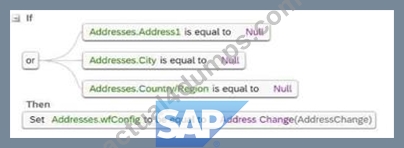
- B.
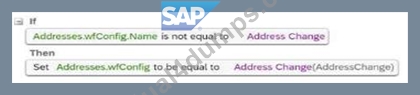
- C.
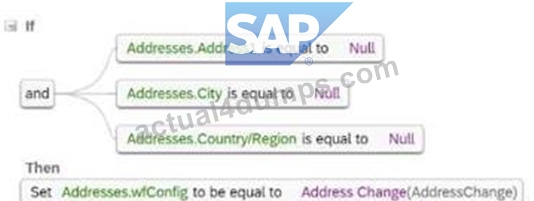
- D.
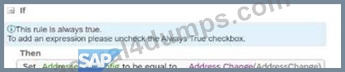
Answer: D
NEW QUESTION # 35
Which rule can effectively catch all unspecified events in a transaction?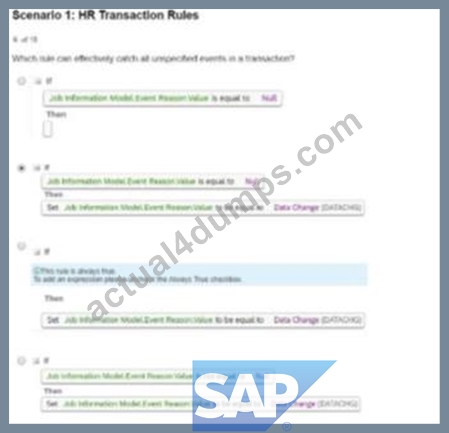
- A. Option A
- B. Option D
- C. Option B
- D. Option C
Answer: C
NEW QUESTION # 36
Your customer would like to automate its company's HR transactions. This includes auto-populating fields to reduce data entry errors and automating approvals during self-service transactions.
You are asked to create the following rules based on your customer's requirements:
. Three event reason derivation rules (ERD1. ERD2, ERD3)
* A separate catch-all event reason derivation rule (ERD-Catch)
* A workflow derivation rule based on event reasons (WFD)
* A rule to auto-populate the Job Title, Pay Grade, and Employee Class field values in the Job Information whenever the job code is changed (Default_JobClass)
* A rule to use AddressChange workflow for any address change requests (WFD_Address)
* A cross-entity rule to auto-calculate the Base_Salary amount based on changes to the FTE value for any event other than Hire or Rehire (Joblnfo_FTE_Comp) Answer the questions to ensure the event reasons and workflow rules adhere to SAP SuccessFactors recommended practices.
Which rule supports the Default_JobClass requirement?
- A.
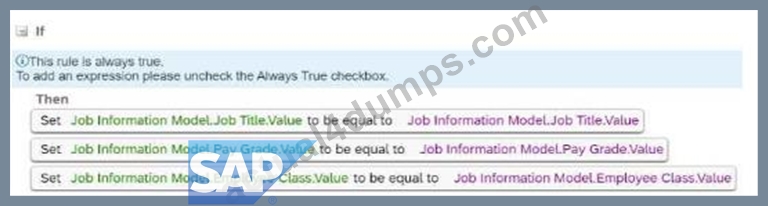
- B.
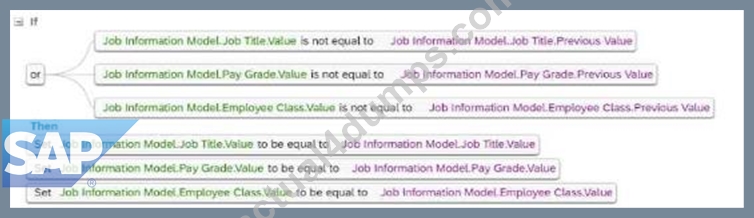
- C.
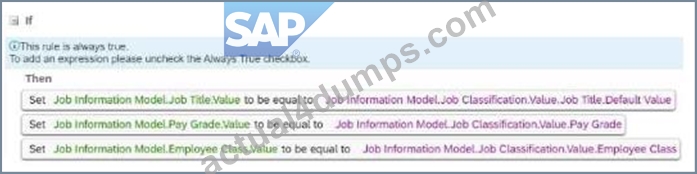
- D.
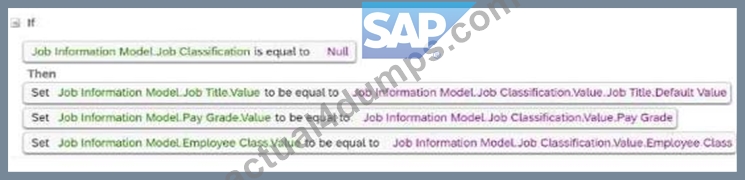
Answer: B
NEW QUESTION # 37
Based on the screenshot below, can you identify any errors on the definition of the business rule to Default Position Attributes? Note: There are 2 correct answers to this question.
- A. The Company field should NOT be included in the business rule.
- B. The FTE field should be derived from the business rule to Calculate FTE based on Standard Hours.
- C. The Parent Position field should NOT be included in the business rule.
- D. The workflow configuration should NOT be included in the business rule.
Answer: B,C
Explanation:
* C. The Parent Position field should NOT be included in the business rule:
* The Parent Position field is typically derived automatically based on position hierarchy and does not require explicit inclusion in a business rule for defaulting position attributes.
* D. The FTE field should be derived from the business rule to Calculate FTE based on Standard Hours:
* The FTE (Full-Time Equivalent) value should be calculated using a dedicated rule that accounts for standard hours, rather than being directly included in a defaulting rule.
Including these fields inappropriately can lead to data inconsistencies or rule execution issues.
NEW QUESTION # 38
How should you build the IF condition to identity the user when the employee is updating their own Personal Information?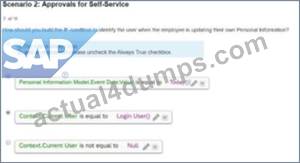
- A. Option A
- B. Option C
- C. Option D
- D. Option B
Answer: B
NEW QUESTION # 39
Your customer would like to automate its company's HR transactions. This includes auto- populating fields to reduce data entry errors and automating approvals during self-service transactions. You are asked to create the following rules based on your customer's requirements:
* Three event reason derivation rules (ERD1, ERD2, ERD3)
* A separate catch-all event reason derivation rule (ERD-Catch)
* A workflow derivation rule based on event reasons (WFD)
* A rule to auto-populate the Job Title, Pay Grade, and Employee Class field values in the Job Information whenever the job code is changed (Default_JobClass)
* A rule to use AddressChange workflow for any address change requests (WFD_Address)
* A cross-entity rule to auto-calculate
In which order must you assign the rules?
- A. ERD1, ERD2, ERD3, ERD-Catch, WFD
- B. ERD1, ERD2, ERD3, WFD, ERD-Catch
- C. ERD-Catch, ERD1, ERD2, ERD3, WFD
- D. WFD, ERD1, ERD2, ERD3, ERD-Catch
Answer: A
NEW QUESTION # 40
Based on the screenshot below, can you identify any errors on the definition of the business rule to Default Position Attributes?Note: There are 2 correct answers to this question.If Then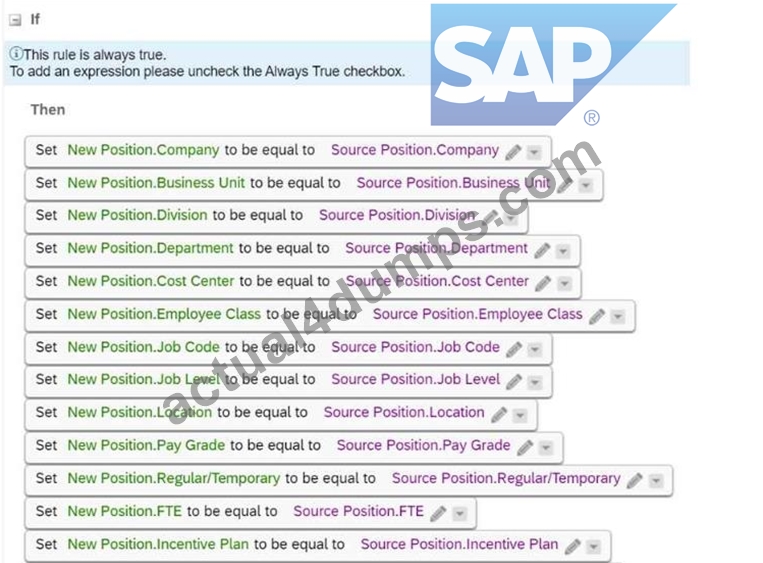
- A. The Company field should NOT be included in the business rule.
- B. The FTE field should be derived from the business rule to Calculate FTE based on Standard Hours.
- C. The Parent Position field should NOT be included in the business rule.
- D. The workflow configuration should NOT be included in the business rule.
Answer: B,C
NEW QUESTION # 41
Where do you enable the Incumbent of Parent Position option to filter positions in Hire, MSS Job Information and History?
- A. In Manage Business Configuration > jobinfo
- B. In Position Management Settings > UI Customizing
- C. In Position Management Settings > Hierarchy Adaptation
- D. In Configure Object Definitions > Position
Answer: C
NEW QUESTION # 42
The employee is changing their marital status. Once the workflow is approved, the manager gets a notification via e-mail that this change has been processed. The manager then goes into the system and checks the workflow, but notices that they can see more fields than the ones for which they should receive a notification (Name, Marital Status, and Nationality). Why is that?
- A. The manager has transactions pending approval permission for Personal Information.
- B. There is a rule that sets up the visibility for the fields in Personal Information and this applies when checking the workflow.
- C. In the workflow, Respect Permissions was set to No for the notification line to the manager.
- D. The manager's approver context is set to Source.
Answer: B
NEW QUESTION # 43
What field of the country-specific Corporate Address element is required in the Corporate Data Model?
- A. Location
- B. Country
- C. City
- D. Address1
Answer: B
NEW QUESTION # 44
Which permission controls a user's access to the Edit button in the history of Job Information?
- A. Edit Link > Edit/Insert
- B. Job Information Actions > Correct
- C. Job Information Actions > Edit/Insert
- D. Job Information Actions > View History
Answer: B
Explanation:
* Job Information Actions > Correctpermission controls the Edit button in the Job Information history.
* This permission allows users to correct existing records without creating a new effective-dated record. It ensures that only authorized users can make retroactive changes to historical data.
Other permissions, such asEdit Link > Edit/Insert,Job Information Actions > Edit/Insert, orJob Information Actions > View History, do not directly control access to the Edit button in the history section.
NEW QUESTION # 45
You have a global customer who has legal entities in multiple countries The customer wants to empower employees and managers to use the system, so they have decided to implement Employee Self-Service and Manager Self-Service. The customer also has payroll integration with different systems and for some countries, the data ts manually maintained in the payroll system.
The requirements are as follows
* Employees should be able to update their Personal information, including Last Name Marital Status, and Nationality fields
* Managers should be able to update Job information on the employee's profile but limited only to Location, Cost Center Probation Period, Probation Period Start Date and Probation Period End Date
* Only HR admins should have access to approve the workflows, and the manager should only get CC notifications for Personal Information (Name Marital Status. and Nationality change) For all other changes, the manager should not get any information or notification
* HR admins should be able to change Personal information as well as Employment Information and the HR Business Partner needs to approve these If the HR admin needs to change the Compensation Information approval will need to be granted by their own manager
* For one country, there needs to be another approval from the data team, who will manually maintain the payroll system.
The table below summarizes the permissions for each role: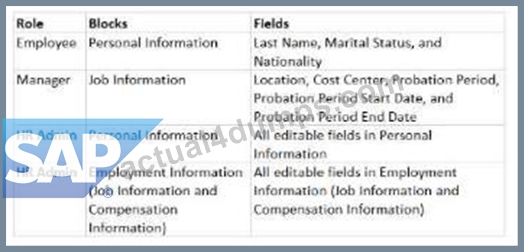
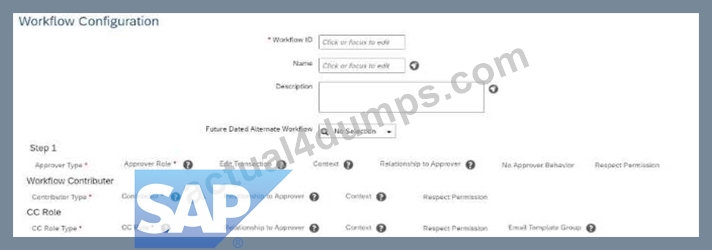
The HR admin has to change the salary of an employee, which will trigger a workflow for the employee's manager. The employee's manager should be able to edit the transaction if the proposed amount is NOT correct. Where in the workflow do you need to define this? Refer to the screenshot to answer the question.
- A. Respect Permission
- B. No Approver Behavior
- C. Context
- D. Edit Transaction
Answer: D
NEW QUESTION # 46
According to SAP guidelines, what can you do in the event picklist when configuring events and event reasons? Note: There are 3 correct answers to this question.
- A. Change the status.
- B. Change the labels.
- C. Add a new language translation.
- D. Add a new event.
- E. Change the external_code of an event.
Answer: A,B,C
Explanation:
When configuring events and event reasons in SAP SuccessFactors, you can perform the following actions:
* A. Add a new language translation
* New language translations can be added for events and event reasons to support multilingual organizations.
* B. Change the status
* You can activate or deactivate events based on organizational needs.
* D. Change the labels
* Labels for events can be modified for better understanding and alignment with organizational terminology.
C: Change the external_code of an eventandE. Add a new eventare incorrect as external codes are immutable once created, and adding events requires admin-level access beyond event picklist configuration
NEW QUESTION # 47
Which clause meets the WFD_Address rule requirement?
- A.

- B.

- C.

- D.

Answer: C
NEW QUESTION # 48
You need to create a one-to-many association from Location to Legal Entity. You also need to configure filtering of the Location field based on the Company field in the Job Information block.
What do you need to add to the data models? Note: There are 2 correct answers to this question.
- A. <field-criteria> as part of <hris-field="location">
- B. <field-criteria> as part of <hris-field="company">
- C. <association> as part of <hris-element id="jobInfo">
- D. <association> as part of <hris-element id="location">
Answer: A,D
NEW QUESTION # 49
Which rule can effectively catch all unspecified events in a transaction?
- A.
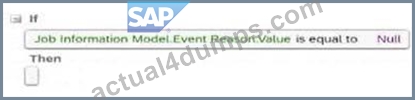
- B.
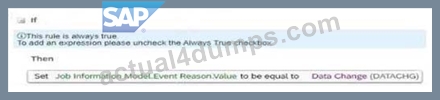
- C.

- D.
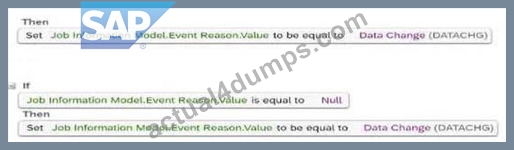
Answer: B
NEW QUESTION # 50
When the manager updates the location of an employee, the HR admin must be the approver Note that the HR admin, manager, and HR Business Partner have access to change the location.
How do you create the IF condition for the workflow derivation rule lo meet the above requirements?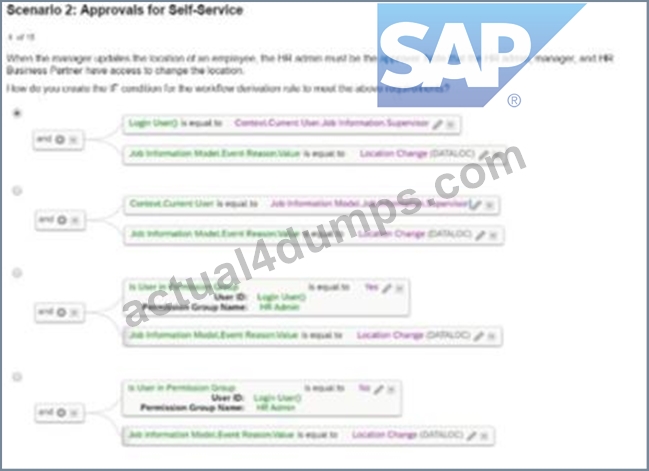
- A. Option D
- B. Option C
- C. Option B
- D. Option A
Answer: D
NEW QUESTION # 51
What must be done to ensure that you can use a custom generic (MDF) object for Employee Self- Service? Note: There are 2 correct answers to this question.
- A. Create one configuration UI for the object.
- B. Create a Valid When association for the object.
- C. Set the externalCode field to Data Type = User.
- D. Set the externalName field to Data Type = User.
Answer: A,B
NEW QUESTION # 52
In which cases should the value for CREATE Respects Target Criteria be set to Yes in the Position object definition? Note: There are 2 correct answers to this question.
- A. To restrict access to create positions based on the granted user's target population
- B. To restrict access to create lower-level positions from the Position Org Chart
- C. To restrict access to create positions from Manage Positions
- D. To restrict access at the field level when creating positions
Answer: A,B
Explanation:
TheCREATE Respects Target Criteriasetting in the Position object definition ensures that the system applies access control criteria when creating positions. This is critical for maintaining organizational and data security. It should be set toYesin the following cases:
* A. To restrict access to create positions based on the granted user's target population:
* This ensures that users can only create positions for entities (e.g., departments, locations) within their authorized target population.
* C. To restrict access to create lower-level positions from the Position Org Chart:
* This limits the ability to create subordinate positions in the hierarchy to authorized users, maintaining the integrity of position relationships.
NEW QUESTION # 53
Which permission controls a user's access to the Edit button in the history of Job Information?
- A. Edit Link > Edit/Insert
- B. Job Information Actions > Correct
- C. Job Information Actions > Edit/Insert
- D. Job Information Actions > View History
Answer: B
NEW QUESTION # 54
Which method of modifying employee data will trigger an event reason derivation?
- A. Using Actions menu in People Profile
- B. Inserting a new record in history UI
- C. Using Add New Hire
- D. Deleting a record in history UI
Answer: A
Explanation:
Event Reason Derivation in SAP SuccessFactors Employee Central is triggered when changes are made to employee data through specific actions. Utilizing the "Actions" menu in the People Profile to update employee information initiates the Event Reason Derivation process. This mechanism automatically determines the appropriate event reason based on the nature of the data change.
In contrast, inserting a new record via the history UI, deleting a record in the history UI, or using the "Add New Hire" function does not trigger Event Reason Derivation. These actions either bypass the derivation process or involve scenarios where event reasons are manually selected.
Therefore, the correct answer is:
* B: Using Actions menu in People Profile
This approach ensures that event reasons are accurately derived and recorded in line with the configured business rules in SAP SuccessFactors Employee Central.
NEW QUESTION # 55
How do you create country-specific fields for the Legal Entity object?
- A. As an HRIS element in the Country Specific Field for Corporate Data Model with a Valid When association to the Legal Entity object
- B. As a generic object with a composite association to the Legal Entity object
- C. As a generic object with a Valid When association to the Legal Entity object
- D. As an HRIS element in the Corporate Data Model with a composite association to the Legal Entity object
Answer: B
NEW QUESTION # 56
......
Get Instant Access REAL C_THR81_2405 DUMP Pass Your Exam Easily: https://www.actual4dumps.com/C_THR81_2405-study-material.html